A smart mower sounds convenient—what are you really buying?
You’re not just buying a mower that “drives itself.” You’re buying a small outdoor robot that needs a defined work zone, regular supervision at the start, and a routine for keeping its cutting system and sensors clean. Most models cut a little at a time on a schedule, which can keep a lawn consistently short, but they usually won’t rescue a yard that’s already overgrown. Convenience comes from trading one long mowing session for smaller, ongoing tasks: installation, occasional rescues, blade changes, and troubleshooting when it gets stuck. The payoff depends less on yard size and more on how predictable your yard is week to week.
Your yard’s layout can make or break the experience
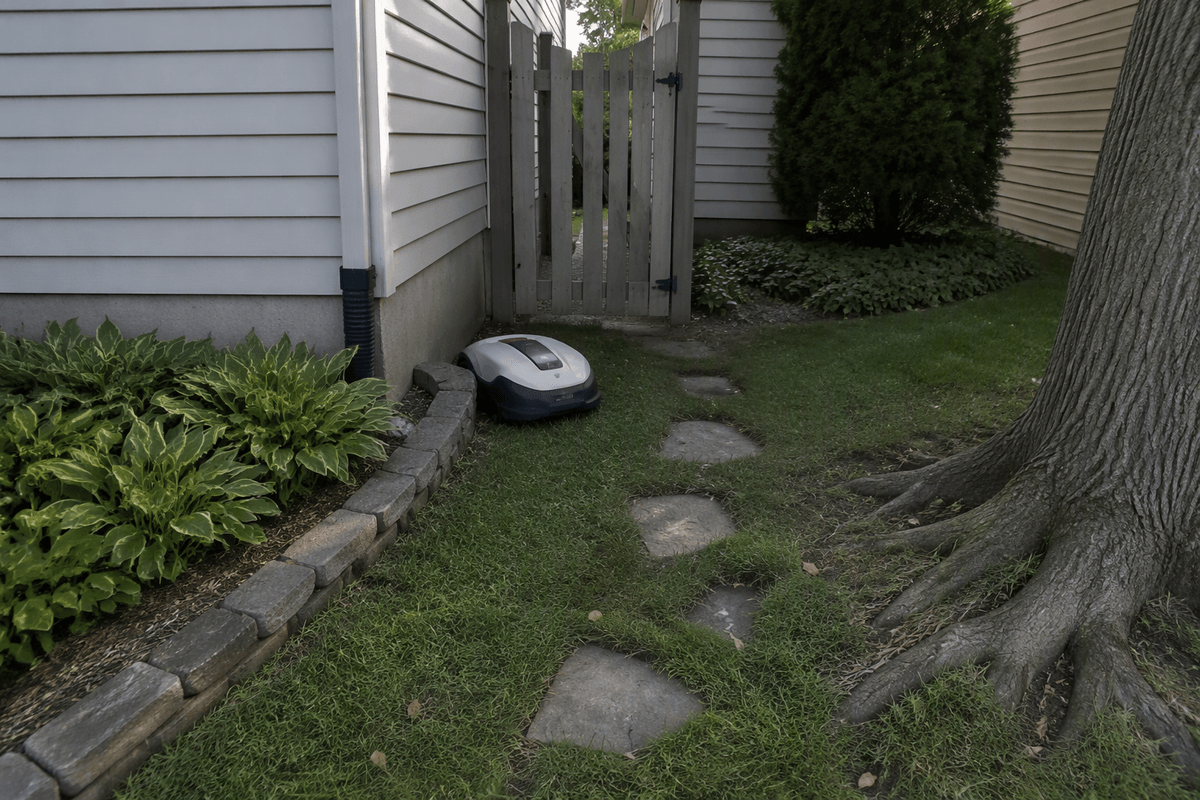
A robot mower does best when your yard behaves like a simple map: one main lawn area, clear edges, and predictable obstacles. Open rectangles and gentle curves are easy. Lots of pinch points—narrow side yards, tight gates, stepping-stone paths, exposed roots, or landscaping borders that sit just above grass height—are where you’ll see the “rescue it from being stuck” problem show up.
Slopes matter in two ways: traction and how the mower finds its way back to charge. A long, steady incline is usually easier than short, steep sections near a fence line where it can slip and ride the boundary. Multiple zones (front and back yard) can work, but you’re signing up for either extra setup, a more advanced navigation system, or physically moving the mower. The practical constraint is time: the more complex the layout, the more setup hours you’ll spend proving the mower can finish a run without help.
Installation and upkeep: easy set-and-forget or weekend project?
Picture the first weekend: you’re walking the perimeter, deciding what counts as “lawn,” and testing whether the mower can pass through your tight spots without climbing a border or nosing into mulch. Boundary-wire models usually take longer up front because you’re staking or burying wire, tuning distances around beds and trees, and fixing the inevitable “missed corner” after the first few runs. Wire-free models can be faster to start, but they still need careful mapping and may demand stronger GPS coverage, cleaner sight lines, or extra beacons in problem areas.
After setup, the work shifts to small, recurring chores. Expect blade swaps every few weeks to months (faster in sandy soil), quick cleanouts of packed grass, and occasional sensor or wheel checks. You’ll also spend time on the unglamorous stuff: keeping the charging contacts clean, updating firmware, replacing perimeter wire breaks, and rescuing it after storms, fallen branches, or surprise holes.
Cost math: purchase price, time saved, and hidden extras
The sticker price is only the start. A robot mower usually lands somewhere between “nice push mower” and “small riding mower,” and the real comparison is what you’re replacing: your own time or a mowing service. If you mow 45–60 minutes a week for 26 weeks, that’s roughly 20–26 hours a season. Put a dollar value on those hours and you’ll see quickly whether the purchase makes sense for you—or whether paying a crew every 1–2 weeks is still cheaper for a small, simple lawn.
Hidden extras are where budgets drift: replacement blades, occasional wheels or battery wear, and accessories like extra boundary wire, connectors, stakes, guide wires, beacons, or an RTK/GPS base station depending on the system. You may also need better yard Wi‑Fi, a weatherproof outdoor outlet, or a small pad or shelter for the dock. The practical cost is time, too: the first few weeks often include “tuning” runs that don’t feel like time saved yet.
Cut quality and lawn health: what results to expect
The typical robot-mower look is “consistently short” more than “freshly striped.” Because it cuts often and removes only a little each pass, clippings act like fine mulch and usually disappear into the canopy, which can reduce bagging and help steady growth if you’re not overwatering or overfertilizing. You’ll notice the biggest improvement on lawns that used to get cut too infrequently; the mower keeps you out of the cycle of letting grass get tall, then shocking it with a big cut. On the flip side, if you like a taller mowing height, make sure the model’s max height matches your grass and summer heat strategy.
Edges and obstacles are where results look less “finished.” Many units won’t cut right up to fences, walls, tree rings, or raised borders, so you’ll still plan on trimming. Wet grass and heavy leaf drop can also leave clumps or missed patches, and steep spots can lead to uneven cuts if traction slips.
Noise, safety, and security in a real neighborhood
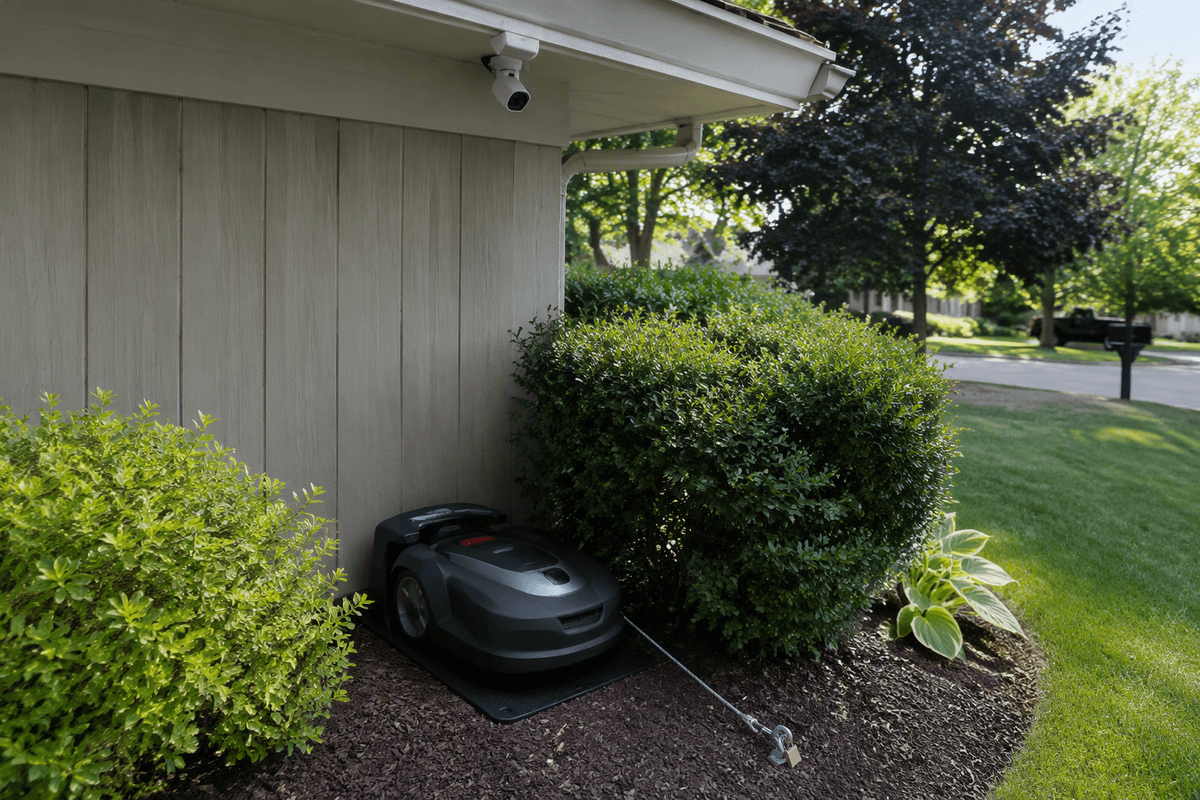
You’ll notice the noise difference immediately: most robot mowers are more like a steady hum than a gas engine, so early-morning schedules are less disruptive. The trade-off is frequency—neighbors may hear it more often, just at a lower volume. Safety is mostly about predictability: they’re slow, but you still need rules for kids’ toys, hoses, and pet bowls so the mower doesn’t chew them up (or get stuck). If you have pets, especially small dogs, don’t assume the sensors will always “do the right thing” without supervision the first few weeks.
Security is the practical headache. These units are portable and expensive, so theft risk is real in unfenced front yards. Look for PIN/app locks, lift alarms, GPS tracking, and a dock location that’s not visible from the street—then assume you’ll still want a cable lock or a camera if your area has regular package theft.
Choosing the right type: boundary wire, wire-free, or “smart” add-ons
The biggest fork is how the mower knows where “lawn” ends. Boundary-wire systems are usually the most predictable once dialed in: the wire is a physical rule the mower follows, and trees, shade, and Wi‑Fi dead spots matter less. The cost is up-front labor and occasional repairs—one aeration, edging job, or rodent chew can create a break you’ll have to hunt down. They also handle odd-shaped yards well because you can draw the shape directly with wire.
Wire-free models trade that trench-and-tune work for sensors and positioning. They can be fast to start, and some handle multiple zones more elegantly, but they’re more sensitive to the real world: patchy GPS near tall trees or houses, narrow side yards, and seasonal changes (leaf-out, snow stakes, moved furniture) can mean remapping or adding beacons/base stations. “Smart” add-ons—app scheduling, weather pausing, remote cameras, GPS theft tracking—help most when you’re away, but they don’t fix a layout problem; they mainly reduce how often you have to babysit it.
So, is it worth it for your yard? A quick decision checklist
If your lawn is mostly one zone, has wide passes, modest slopes, and you’re okay trimming edges, a robot mower is usually worth it when you value consistency and want to reclaim 20+ hours of seasonal mowing time. It’s a harder sell when you have tight corridors, lots of raised borders, frequent sticks/toys, or an unfenced front yard where theft is a real concern.
Quick checklist: (1) Can it reach the dock without struggling on slopes? (2) Will your layout work with your chosen boundary method (wire vs wire-free coverage)? (3) Do you have a plan for weekly “yard prep” and blade changes? (4) Are you comfortable with ongoing costs (blades, occasional parts, possible battery)? If you’re “no” on two or more, a traditional mower or mowing service is often the lower-hassle choice.